Writing iOS XCTests in Rust
Introduction§
In this post, I'll briefly show how to bundle a rust binary into an iOS app as well as the complexities of bundling a XCTest app written in rust. I can't say that this should be used in production. I only figured out how to do this a few months ago (~November 2025) so this might be a brittle setup.
I'll also briefly touch on how to get code coverage reports via the XCTest and App itself.
The code here is available in code subdirectory of this
repo
if you want to use it.
Running the stuff from this post requires:
- xcode installed
- the iphone SDK tooling installed
- rust installed along with the
aarch64-apple-ios-simtarget - Starting the
iPhone 16esimulator.
This post is best viewed on desktop.
Background§
While XCTest has been around since Xcode
5, XCUIAutomation wasn't
it's own framework nor in the public framework list until Xcode
16.3.
When it was added as a public API (rather than private), this change enabled
objc2 to generate bindings for
objc2-xc-test and
objc2-xc-ui-automation.
These two rust crates call into the Objective-C APIs for XCTest and
XCUIAutomation.
I don't believe it's very well documented how an XCTest app is ran. What I can
say is that it's packaged similar to a regular iOS app but the executable is
either derived from or is the XCTRunner which I've shown here. I hypothesize
that this executable looks for things that derive from the Objective-C XCTest
class. Later in this post you'll see a #[ctor::ctor] around a function that
just calls let _ = TestCase::class();
This is more or less the architecture. RustApp is the app we're testing against and RustUITests is the app doing the testing/automating.
|-----------------|                                         |-----------------|
|                 |             app.launch()                |                 |
|  RustUITests    |                 ->                      |     RustApp     |
|                 |             app.state()                 |                 |
|-----------------|                                         |-----------------|
Then to do an action it's something like:
|-----------------|                                         |-----------------|
|                 |  let input = app.textFields().element() |     No text     |
|  RustUITests    |                ->                       |     RustApp     |
|                 |            input.tap()                  |   Now has text  |
|-----------------|     input.typeText(foo_ns_string);      |-----------------|
In theory, one could be writing these UI Tests against a react-native app rather
than a Rust objc2-ui-kit app.
Note: These bindings are generated based on targeting macOS for
now. Various work arounds for
some calls have been added. For
this reason, the examples here are using a [patch.crate-io] for the objc2
crates. This also enables us to a nicer/not-yet-released declare_class! macro
from objc2
Rust iOS app bundling hacks§
In my previous post about using a target runner for
ios, the bulk of the exercise was about
just bundling a rust executable into an iOS app. In short, an iOS app is a
directory suffixed with .app, an Info.plist and a binary.
The simplest manifest(Info.plist) I've found is:
<?xml version="1.0" encoding="UTF-8"?>
<!DOCTYPE plist PUBLIC "-//Apple//DTD PLIST 1.0//EN" "http://www.apple.com/DTDs/PropertyList-1.0.dtd">
<plist version="1.0">
<dict>
	<key>CFBundleExecutable</key>
	<string>use-objc2-xc-ui-automation</string>
	<key>CFBundleIdentifier</key>
	<string>com.simlay.net.Dinghy</string>
	<key>CFBundleName</key>
	<string>RustWrapper</string>
	<key>CFBundleShortVersionString</key>
	<string>arm64</string>
	<key>CFBundleVersion</key>
	<string>arm64</string>
	<key>UILaunchStoryboardName</key>
	<string></string>
</dict>
</plist>
The key parts here are CFBundleExecutable as use-objc2-xc-ui-automation
which is the executable and CFBundleIdentifier as com.simlay.net.Dinghy
which is the identifier when launching the app via simctl launch booted com.simlay.net.Dinghy.
Given that bundling is a post-cargo build step, I wrap this in a Makefile:
EMULATOR='iPhone 16e'
WRAPPER_ID=com.simlay.net.Dinghy

build:
	cargo build --target aarch64-apple-ios-sim --all --all-targets

bundle: build
	cp ./target/aarch64-apple-ios-sim/debug/use-objc2-xc-ui-automation ./RustApp.app/

install: bundle
	xcrun simctl install $(EMULATOR) ./RustApp.app/

run: install
	xcrun simctl launch --console --terminate-running-process $(EMULATOR) $(WRAPPER_ID)
Here, make run will run cargo build, copy the executable, put it in the
expected location, install and launch it in the iPhone 16e simulator. (The
simulator is expected to be booted up).
This should output:
$ make run
cargo build --target aarch64-apple-ios-sim --all --all-targets
    Finished `dev` profile [unoptimized + debuginfo] target(s) in 0.00s
cp ./target/aarch64-apple-ios-sim/debug/use-objc2-xc-ui-automation ./RustApp.app/
xcrun simctl install 'iPhone 16e' ./RustApp.app/
xcrun simctl launch --console --terminate-running-process 'iPhone 16e' com.simlay.net.Dinghy
com.simlay.net.Dinghy: 74660
Hello, world!
It's a little out of scope for this post but the smallest "app" I've found for
this to be a single view that's just a UITextField.
use objc2::{
    define_class, msg_send,
    rc::{Allocated, Retained},
    runtime::AnyObject,
    ClassType, Ivars, MainThreadMarker, MainThreadOnly,
};

use objc2_foundation::{NSDictionary, NSObject, NSObjectProtocol, NSString};
use objc2_ui_kit::{
    UIApplication, UIApplicationDelegate, UIApplicationLaunchOptionsKey, UIScreen, UITextField,
    UIViewController, UIWindow,
};

define_class!(
    // SAFETY:
    // - `NSObject` does not have any subclassing requirements.
    // - `AppDelegate` does not implement `Drop`.
    #[unsafe(super(NSObject))]
    #[thread_kind = MainThreadOnly]
    struct AppDelegate {
        window: std::cell::RefCell<Option<Retained<UIWindow>>>,
    }

    impl AppDelegate {
        // Called by `UIApplication::main`.
        #[unsafe(method_id(init))]
        fn init(this: Allocated<Self>) -> Retained<Self> {
            let this = this.set_ivars(Ivars::<Self> {
                window: std::cell::RefCell::new(None),
            });
            unsafe { msg_send![super(this), init] }
        }
    }

    unsafe impl NSObjectProtocol for AppDelegate {}

    unsafe impl UIApplicationDelegate for AppDelegate {
        #[unsafe(method(application:didFinishLaunchingWithOptions:))]
        unsafe fn did_finish_launching_with_options(
            &self,
            application: &UIApplication,
            launch_options: Option<&NSDictionary<UIApplicationLaunchOptionsKey, AnyObject>>,
        ) -> bool {
            let mtm = MainThreadMarker::new().expect("Failed to get mtm");
            let window = UIWindow::new(mtm);
            window.setFrame(UIScreen::mainScreen(mtm).bounds());
            window.makeKeyAndVisible();
            *self.window().borrow_mut() = Some(window);

            let view_controller = UIViewController::new(mtm);
            let text_field = UITextField::new(mtm);
            text_field.setText(Some(&NSString::from_str("THIS IS THE DEFAULT TEXT")));

            self.window().borrow().as_ref().unwrap().setRootViewController(Some(&view_controller));
            view_controller.setView(Some(&text_field));
            text_field.setBackgroundColor(Some(&objc2_ui_kit::UIColor::whiteColor()));
            true
        }
    }
);

fn main() {
    set_llvm_profile_write();
    println!("Hello, World!");
    let mtm = MainThreadMarker::new().unwrap();
    let delegate_class = NSString::from_class(AppDelegate::class());
    UIApplication::main(None, Some(&delegate_class), mtm);
}
The thing missing in this file is the definition of set_llvm_profile_write
which is covered in the code coverage section below.
Using objc2-xc-test and objc2-xc-ui-automation§
To use the XCTest and XCUIAutomation from rust you declare the class and use
ctor to register the class. This is a #![no_main] rust binary. The actual test here will:
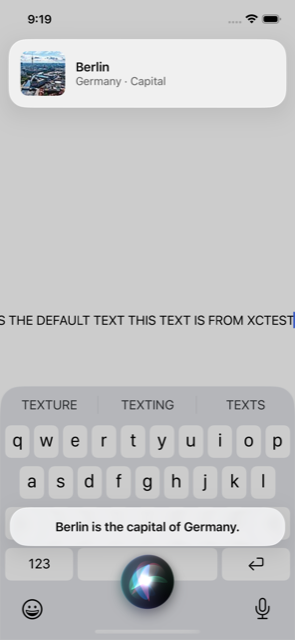
- Start the app (possibly with a
LLVM_PROFILE_FILEenvironment variable set). - It will tap on the one and only text field
- Type some text into the
UITextfield. - Take a screenshot
- Ask siri a question from plain text
- Tap the home button - This will exit siri.
- Tap the home button again - This will background the app (triggering an
__llvm_profile_write_filefor code coverage).
#![no_main] // Required, we build this with `-bundle`.
use objc2::{ClassType, MainThreadOnly, define_class};
use objc2_foundation::NSString;
use objc2_foundation::{
    NSSearchPathDirectory, NSSearchPathDomainMask, NSSearchPathForDirectoriesInDomains,
    NSDictionary, ns_string,
};
use objc2_xc_test::XCTestCase;
use objc2_xc_ui_automation::{
    XCUIApplication, XCUIDevice, XCUIElementTypeQueryProvider, XCUIScreenshot,
    XCUIScreenshotProviding,
};

define_class!(
    #[unsafe(super = XCTestCase)]
    #[thread_kind = MainThreadOnly]
    struct TestCase;

    impl TestCase {
        #[unsafe(method(setUp))]
        fn set_up(&self) {
            // Test setup code in here.
        }

        #[unsafe(method(tearDown))]
        fn tear_down(&self) {
            // Test teardown code in here.
        }

        #[unsafe(method(testSimple))]
        fn test_simple(&self) {
            let app = XCUIApplication::new(self.mtm());

            // SIMCTL_CHILD_DINGHY_LLVM_PROFILE_FILE
            if let Ok(val) = std::env::var("DINGHY_LLVM_PROFILE_FILE") {
                let envs: objc2::rc::Retained<NSDictionary<NSString, NSString>> =
                    NSDictionary::from_slices(
                        &[
                        ns_string!("LLVM_PROFILE_FILE"),
                        ns_string!("LLVM_PROFILE_VERBOSE_ERRORS"),
                        ],
                        &[&NSString::from_str(val.as_str()), ns_string!("1")],
                    );

                app.setLaunchEnvironment(&envs);
            }

            app.launch();
            let text_view = app.textFields().element();
            text_view.tap();
            text_view.typeText(&NSString::from_str(" THIS TEXT IS FROM XCTEST"));

            let device = XCUIDevice::sharedDevice(self.mtm());
            let siri = device.siriService();
            siri.activateWithVoiceRecognitionText(&NSString::from_str("What is the capital of germany?"));

            std::thread::sleep(std::time::Duration::from_millis(1000));
            save_screenshot(&app.screenshot());

            device.pressButton(objc2_xc_ui_automation::XCUIDeviceButton::Home);
            device.pressButton(objc2_xc_ui_automation::XCUIDeviceButton::Home);

        }
    }
);

/// Load and initialize the class such that XCTest can see it.
#[ctor::ctor]
unsafe fn setup() {
    let _ = TestCase::class();
}

fn save_screenshot(screenshot: &XCUIScreenshot) {
    let path = NSSearchPathForDirectoriesInDomains(
        NSSearchPathDirectory::DocumentDirectory,
        NSSearchPathDomainMask::UserDomainMask,
        true,
    );
    if let Some(path) = path.firstObject() {
        let path = path.to_string();
        let path = std::path::Path::new(&path).join(format!("screenshot.png"));
        let res = screenshot
            .PNGRepresentation()
            .writeToFile_atomically(&NSString::from_str(path.to_str().unwrap()), false);
        assert!(res, "failed writing screenshot");
    }
}
Bundling the XCTests§
Bundling the XCTest into an "iOS app" is a lot more difficult. We need:
build.rsui_tests.xctestconfiguration- this is generated fromui_tests.xctestconfiguration.basewith somesedtext replacements.RustUITests.appand aInfo.plistDinghyUITests.xctest/Info.plist.
Where's what the directory structure looks like with all these:
$ tree
.
├── Cargo.lock
├── Cargo.toml
├── Makefile
├── RustUITests.app
│   ├── Frameworks
│   ├── Info.plist
│   ├── PlugIns
│   │   └── DinghyUITests.xctest
│   │       ├── Info.plist
│   │       └── ui_tests
│   └── XCTRunner
├── RustApp.app
│   ├── Info.plist
│   └── use-objc2-xc-ui-automation
├── src
│   └── main.rs
├── stdout.txt
├── ui_tests
│   ├── build.rs
│   ├── Cargo.toml
│   ├── src
│   │   └── main.rs
│   ├── ui_tests.xctestconfiguration
│   └── ui_tests.xctestconfiguration.base
└── ui_tests.png
The makefile that wraps these things is a bit chaotic. But the general steps are:
- Build the
ui_testsbinary. - Copy it into the
RustUITests.app/Plugins/DinghyUITests.xctest/directory. - Copy a number of frameworks from the
IPhoneSimulator.platform/Developer/Library/Frameworksfrom the xcode SDKs into theRustUITests.app/Frameworksdirectory - Install the app to be tested in the iOS simulator
- Install the UITest app into the iOS simulator
- Get both of their app containers (
xcrun simctl get_container) - Do a
sedreplacement on the container path for the xctest.configuration - Launch the
RustUITestsapp withSIMCTL_CHILD_LLVM_PROFILE_FILE=andSIMCTL_CHILD_DINGHY_LLVM_PROFILE_FILEto enable code coverage.
ui-tests-build:
	cargo build -p ui_tests

ui-tests-bundle-tools: ui-tests-build
	cp $(shell xcode-select --print-path)/Platforms/IPhoneSimulator.platform/Developer/Library/Xcode/Agents/XCTRunner.app/XCTRunner                ./RustUITests.app/
	cp -r $(shell xcode-select --print-path)/Platforms/IPhoneSimulator.platform/Developer/Library/Frameworks                                       ./RustUITests.app/
	cp -r $(shell xcode-select --print-path)/Platforms/IPhoneSimulator.platform/Developer/Library/PrivateFrameworks/XCTestCore.framework           ./RustUITests.app/Frameworks/
	cp -r $(shell xcode-select --print-path)/Platforms/IPhoneSimulator.platform/Developer/Library/PrivateFrameworks/XCTestSupport.framework        ./RustUITests.app/Frameworks/
	cp -r $(shell xcode-select --print-path)/Platforms/IPhoneSimulator.platform/Developer/Library/PrivateFrameworks/XCUnit.framework               ./RustUITests.app/Frameworks/
	cp -r $(shell xcode-select --print-path)/Platforms/IPhoneSimulator.platform/Developer/Library/PrivateFrameworks/XCTAutomationSupport.framework ./RustUITests.app/Frameworks/

ui-tests-bundle: ui-tests-bundle-tools
	cp ./target/aarch64-apple-ios-sim/debug/ui_tests  ./RustUITests.app/Plugins/DinghyUITests.xctest/

ui-tests-install: ui-tests-bundle
	xcrun simctl install $(EMULATOR) RustUITests.app/

XCWRAPPER_ID=com.simlay.net.DinghyUITests.xctrunner

GET_CONTAINER=xcrun simctl get_app_container $(EMULATOR)
DINGHY_CONTAINER_CMD=$(GET_CONTAINER) $(WRAPPER_ID)
DINGHY_CONTAINER=$(shell $(DINGHY_CONTAINER_CMD) data)

XCTEST_CONTAINER_CMD=$(GET_CONTAINER) $(XCWRAPPER_ID)
XCTEST_CONTAINER=$(shell $(XCTEST_CONTAINER_CMD) data)

ui-tests-xctest-configuration: ui-tests-install
	cat ui_tests/ui_tests.xctestconfiguration.base | \
		sed "s:UI_TEST_WRAPPER_CONTAINER:$(shell $(XCTEST_CONTAINER_CMD)):g" | \
		sed "s:WRAPPER_APP_CONTAINER:$(shell $(DINGHY_CONTAINER_CMD)):g" | \
		sed "s:WRAPPER_APP_ID:$(WRAPPER_ID):g" \
		> ui_tests/ui_tests.xctestconfiguration

LAUNCH=xcrun simctl launch --console --terminate-running-process $(EMULATOR)

ui-tests-run: install ui-tests-install ui-tests-xctest-configuration
	SIMCTL_CHILD_DINGHY_LLVM_PROFILE_FILE="$(DINGHY_CONTAINER)/Documents/dinghy.profraw" SIMCTL_CHILD_LLVM_PROFILE_FILE="$(XCTEST_CONTAINER)/Documents/xctrunner.profraw" $(LAUNCH) $(XCWRAPPER_ID) 2>&1 | tee $(PWD)/stdout.txt
	make ui-tests-cp-screenshot

ui-tests-cp-screenshot:
	cp "$(XCTEST_CONTAINER)/Documents/screenshot.png" ui_tests.png
	sips -Z 640 ui_tests.png
Throw this all together and make ui-tests-run should bundle up both apps,
install them into the simulator, and run the XCTests. Generally, after
cargo build finishes, this still takes about 10 seconds to bundle,
install and run. More if there is an error in the XCTests.
At the end of the ui-tests-run rule, it calls make ui-tests-cp-screenshot.
This copies the created screenshot from the app's data directory to the local
one and compresses the image. I've compressed the image quite but you can get
the gist:
Test Coverage reports§
This is a bit of an aside but if we're going this far, we might as well get
test coverage from the App and the UI Test App. To do this, you need "-C", "instrument-coverage" as a rust flag and set the environment variable of
LLVM_PROFILE_FILE for both the XCTest app and the app to be tested. This
is why there is are environment variables of:
SIMCTL_CHILD_DINGHY_LLVM_PROFILE_FILE and
SIMCTL_CHILD_LLVM_PROFILE_FILE which both point to the data path of
their respective app containers.
I have spent a lot of time trying to get the incremental instrumentation
(%c)
but have been unsuccessful. The work around for this is to add a notification
handler for UIApplicationDidEnterBackgroundNotification to call
__llvm_profile_write_file. This is pretty hacky but when the app is
backgrounded, it writes the profile file to LLVM_PROFILE_FILE.
fn set_llvm_profile_write() {
    if std::env::var("LLVM_PROFILE_FILE").is_ok() {
        let _will_terminate_observer = create_observer(
            &objc2_foundation::NSNotificationCenter::defaultCenter(),
            unsafe { objc2_ui_kit::UIApplicationDidEnterBackgroundNotification },
            move |_notification| {
                unsafe extern "C" {
                    safe fn __llvm_profile_write_file() -> std::ffi::c_int;
                }
                let res = __llvm_profile_write_file();
                assert_eq!(res, 0);
            },
        );
    }
}

fn create_observer(
    center: &objc2_foundation::NSNotificationCenter,
    name: &objc2_foundation::NSNotificationName,
    handler: impl Fn(&objc2_foundation::NSNotification) + 'static,
) -> objc2::rc::Retained<objc2::runtime::ProtocolObject<dyn objc2_foundation::NSObjectProtocol>> {
    let block = block2::RcBlock::new(
        move |notification: std::ptr::NonNull<objc2_foundation::NSNotification>| {
            handler(unsafe { notification.as_ref() });
        },
    );

    unsafe { center.addObserverForName_object_queue_usingBlock(Some(name), None, None, &block) }
}
With that in mind, we can make the ui-tests-cov just depend on ui-tests-run.
LLVM_PROFDATA=$(shell rustc --print sysroot)/lib/rustlib/aarch64-apple-darwin/bin/llvm-profdata

COV_IGNORE_LIST=--ignore-filename-regex='/.cargo/registry' --ignore-filename-regex='/.rustup' --ignore-filename-regex='/objc2'

COV_REPORT=$(LLVM_COV) report -Xdemangler=rustfilt --use-color   $(COV_IGNORE_LIST) -instr-profile
COV_EXPORT=$(LLVM_COV) export -Xdemangler=rustfilt --format lcov $(COV_IGNORE_LIST) -instr-profile

ui-tests-cov: ui-tests-run
	mkdir -p target/cov
	cp "$(XCTEST_CONTAINER)/Documents/xctrunner.profraw" ./target/cov/xctrunner.profraw
	cp "$(DINGHY_CONTAINER)/Documents/dinghy.profraw" ./target/cov/dinghy.profraw
	du -hs ./target/cov/*.profraw
	$(LLVM_PROFDATA)  merge -sparse ./target/cov/xctrunner.profraw -o ./target/cov/xctrunner.profdata
	$(LLVM_PROFDATA)  merge -sparse    ./target/cov/dinghy.profraw -o ./target/cov/dinghy.profdata
	$(COV_REPORT) ./target/cov/xctrunner.profdata ./target/aarch64-apple-ios-sim/debug/ui_tests
	$(COV_REPORT) ./target/cov/dinghy.profdata    ./target/aarch64-apple-ios-sim/debug/use-objc2-xc-ui-automation
	$(COV_EXPORT) ./target/cov/xctrunner.profdata ./target/aarch64-apple-ios-sim/debug/ui_tests        > ./target/cov/xctrunner-lcov.info
	$(COV_EXPORT) ./target/cov/dinghy.profdata    ./target/aarch64-apple-ios-sim/debug/use-objc2-xc-ui-automation > ./target/cov/dinghy-lcov.info
	genhtml ./target/cov/dinghy-lcov.info ./target/cov/xctrunner-lcov.info -o ./target/cov/
Assuming you've got the genhtml installed, this will generate a coverage
report html in target/cov/index.html.
build.rs§
The build.rs is something you'll probably copy from somewhere else (just like
I did). Notably you need to a to have it link against the testing
frameworks. Also because this requires the ui_tests to be in it's own crate
in the workspace.
//! Allow linking to XCTest in the fashion that it expects.
use std::env;
use std::process::Command;

fn xcode_select_developer_dir() -> Option<String> {
    let output = Command::new("xcode-select")
        .arg("--print-path")
        .output()
        .ok()?;
    if !output.status.success() {
        return None;
    }
    let mut stdout = output.stdout;
    if let Some(b'\n') = stdout.last() {
        let _ = stdout.pop().unwrap();
    }
    Some(String::from_utf8(stdout).unwrap())
}

fn main() {
    // The script doesn't depend on our code
    println!("cargo:rerun-if-changed=build.rs");

    let developer_dir = xcode_select_developer_dir();
    let developer_dir = developer_dir
        .as_deref()
        .unwrap_or("/Applications/Xcode.app/Contents/Developer");

    let os = env::var("CARGO_CFG_TARGET_OS").unwrap();
    let abi = env::var("CARGO_CFG_TARGET_ABI");
    let abi = abi.as_deref().unwrap_or("");

    let sdk_name = match (&*os, abi) {
        ("macos", "") => "MacOSX",
        ("ios", "") => "iPhoneOS",
        ("ios", "sim") => "iPhoneSimulator",
        // Mac Catalyst uses the macOS SDK
        ("ios", "macabi") => "MacOSX",
        ("tvos", "") => "AppleTVOS",
        ("tvos", "sim") => "AppleTVSimulator",
        ("visionos", "") => "XROS",
        ("visionos", "sim") => "XRSimulator",
        ("watchos", "") => "WatchOS",
        ("watchos", "sim") => "WatchSimulator",
        (os, abi) => unreachable!("invalid os '{os}' / abi '{abi}' combination for Apple target"),
    };

    // XCTest and XCUIAutomation live inside:
    // `/Applications/Xcode.app/Contents/Developer/Platforms/MacOSX.platform/Developer/Library/Frameworks`
    println!(
        "cargo:rustc-link-search=framework={developer_dir}/Platforms/{sdk_name}.platform/Developer/Library/Frameworks"
    );
    println!(
        "cargo:rustc-link-search=native={developer_dir}/Platforms/{sdk_name}.platform/Developer/usr/lib"
    );

    // Configure the test binary as a bundle instead.
    println!("cargo:rustc-link-arg-bins=-bundle");
    // + #![no_main] and #[ctor]
    // + maybe -bundle_loader app_under_test?

    // TODO: Are these necessary?
    println!("cargo:rustc-link-arg-bins=-Xlinker");
    println!("cargo:rustc-link-arg-bins=-debug_variant");
    println!("cargo:rustc-link-arg-bins=-Xlinker");
    println!("cargo:rustc-link-arg-bins=-export_dynamic");
    println!("cargo:rustc-link-arg-bins=-Xlinker");
    println!("cargo:rustc-link-arg-bins=-no_deduplicate");
}Caveats§
Getting the exit status of any running iOS app is not a simple task.
cargo-dinghy gets the exit status by
spawning the application in debug mode, attaching and running the process via
the debugger. This has been described as "more or less cursed". For this
reason, I suggest the hack of copying the screenshot(s) out of the XCTest app's
data directory. If the cp fails, the tests have failed.
I got the xctestconfiguration by creating an Xcode project and a little bit
of reverse engineering throwing in the App's ID and the container path.
Closing thoughts§
This is a pretty brittle setup and I'm not sure I suggest it in production. One can't get the exit status easily, getting this to run on a device is still quite unclear - How do I get the data container on device?.
Once setup, I find the TUI interface for development a lot nicer in general.
The xcodebuild tooling is just a bit worse than a set of make lines. It
should be noted that Xcode isn't needed to be open for this at all.
The other cool thing about this setup is that one can run XCTests against an app that's not in the same project. I actually spent a lot of time trying to write automation tests against Safari in the simulator (it did not work).
Shout out to mads for doing great work on all
the things in objc2.